Amazon Bee Privacy Explained: What It Records, Where Data Goes and How to Delete It
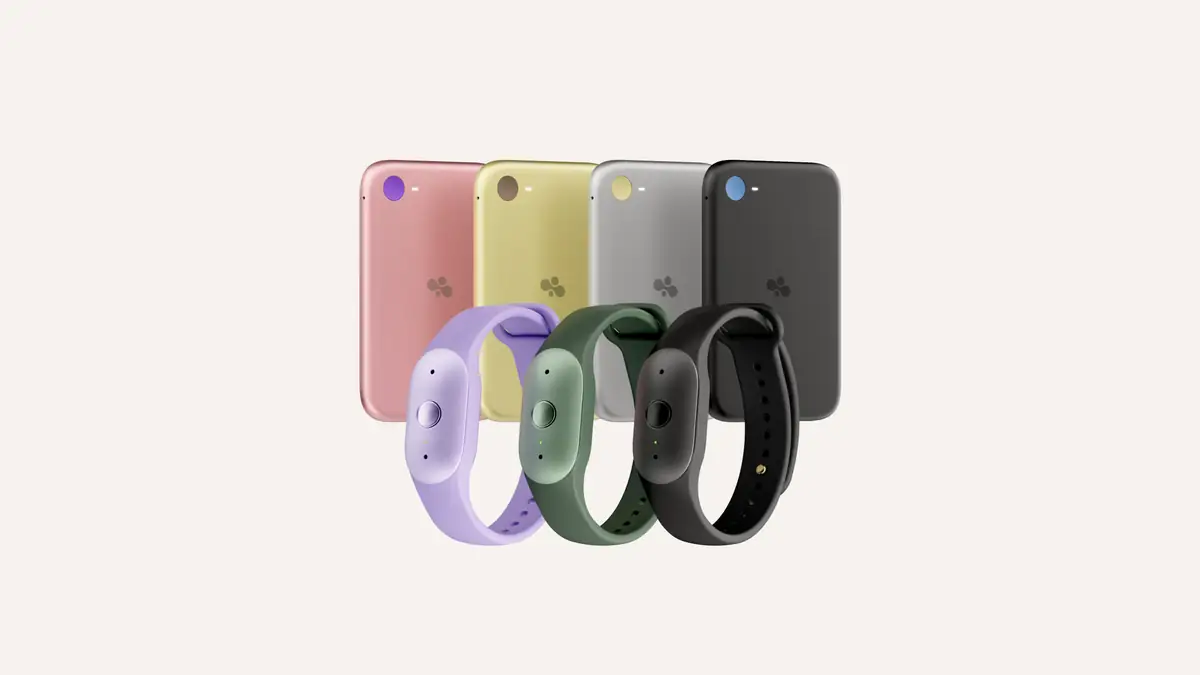
Amazon Bee listens to the conversations around you while it's switched on, but Amazon says it doesn't keep the audio. Speech is transcribed in real time and then discarded. What remains is text (transcripts, summaries, to-dos and insights), which Amazon says is encrypted with keys that only your device creates and controls. You can delete transcripts and summaries at any time. The bigger privacy decisions come later, when you choose to connect Bee to Alexa+, Amazon.com or other apps.
All of these claims come from Amazon and Bee. Amazon points to a third-party audit by the security firm Trail of Bits and to a technical white paper, but readers should treat this as the company's own account of how the system works. For the product launch itself, see our main story on Amazon's Bee Frontier and Bee Eclipse AI wearables.
What does Amazon Bee record?
Bee is built to capture everyday speech: meetings, lectures, conversations with friends, appointments with doctors. It turns them into summaries and action items. Amazon's 15 October 2026 announcement gives examples such as creating calendar invites from plans you've agreed, taking notes in a lecture, and recording the care plan a doctor gives you.
The devices that do the listening are:
- Bee Frontier ($74.99, on sale now): a wrist or clip-on wearable with dual microphones and noise filtering.
- Bee Eclipse (from $99.99, coming soon): a card-sized device that attaches magnetically to the back of your phone.
Both have a single on/off button and an indicator light that shows when Bee is listening. Bee Frontier can also switch itself off after a set period with no sound, such as 5 or 15 minutes, according to Amazon.
There's one thing to understand from the start. Bee hears everyone near you, not just you. Amazon says Bee Eclipse will ask you to get permission from the other people on a call each time a recording starts. Amazon hasn't described a similar prompt for Bee Frontier in person, so asking people is up to you.
Does Bee store audio recordings?
According to Amazon, no. Its privacy explainer says Bee "does not store your audio" and that conversations are processed in real time and then discarded. The launch announcement repeats this: audio is turned into insights in real time and deleted, and no audio is stored.
What Bee does keep:
| Data | Kept? | What Amazon says |
|---|---|---|
| Raw audio | No | Processed in real time, then deleted |
| Transcripts | Yes | Encrypted with keys your device creates and controls |
| Summaries, to-dos, insights | Yes | Encrypted the same way; you can delete them |
| Memory (free tier) | 14 days | Free users get 14 days of memory |
| Data shared with connected apps | Depends | Handled under that service's rules once shared |
Because the audio is gone, you can't play back a conversation to check what someone actually said. The transcript is the record.
Where does Bee data go? Bee Private Compute explained
Amazon calls Bee's processing system Bee Private Compute. Its explainer and launch post describe four main parts:
- Encryption on your device. Transcripts and insights are encrypted with keys that only your device creates and controls. Amazon says it has no master key.
- Server checks before upload. Before your device sends anything to Amazon's servers, it checks that the server is running approved, trusted software. This is called attestation.
- Isolated processing. Data is processed in a secure, isolated environment that Amazon says "no one, including Amazon and Bee, can access".
- AWS hardware. Amazon says Private Compute is built on the AWS Nitro System and NitroTPM, part of its confidential-computing infrastructure.
Amazon also says its employees can't access your transcripts unless you deliberately share them.
What this doesn't settle: Amazon's materials don't say, in the sources we reviewed, whether your Bee data is used to train AI models, how long encrypted transcripts are kept if you never delete them, or what happens to stored data if you cancel Bee Pro. Those are fair questions to ask before you buy.
Signing in with Amazon: does Amazon see your Bee data?
Bee now lets you sign in with an Amazon account, while existing users can keep signing in with Apple or Google. Amazon says the Amazon sign-in "does not give Amazon access to your private Bee data". In other words, the account handles login, and the encryption keys are what control access to your data.
What changes when you connect Alexa+ or Amazon.com
This is where the privacy picture changes most. Connections are optional and need Bee Pro ($11.99 a month after a 30-day free trial for new customers).
| Connection | What it does | Privacy consideration |
|---|---|---|
| Alexa+ | Ask Echo devices for summaries, to-dos and details from conversations | Echo devices use voice ID to recognise you. Amazon says Echo devices can also recognise your voice and record conversations for Bee insights |
| Amazon.com | Product suggestions based on things you mention, on the Amazon homepage and in Bee apps. Hands-free purchases via Alexa+ | What you talk about can shape the shopping suggestions you see |
| Gmail, Google Calendar, Outlook | Draft emails, schedule meetings, find action items | Data goes to Google or Microsoft services |
| Apple HealthKit, photos | Add wellness and visual context | Health data feeds into insights |
There's an important limit to keep in mind. Bee Private Compute describes how Bee itself processes your data. Once you send information to another service, such as Gmail or Outlook, that service handles it, and its own storage and deletion rules apply. Amazon says you choose what to share and can stop sharing at any time. Stopping future sharing isn't the same as deleting what a service already has.
The Amazon.com connection is the part that has drawn the most attention. Headlines about Amazon devices that "listen to conversations and suggest things to buy" describe a real feature, but it's opt-in. Bee doesn't link to Amazon.com shopping by default.
How to delete your Amazon Bee data
Amazon says you can delete transcripts and summaries at any time, and that only you can access them unless you choose to share them. Amazon hasn't published a step-by-step deletion guide in the sources we reviewed, so these are general steps rather than an exact menu path:
- Delete individual conversations in the Bee app. Look for the conversation's transcript or summary and its delete option.
- Turn off connections you no longer want, such as Alexa+, Amazon.com and third-party apps, so no new data is shared.
- Ask connected services to delete what they already have. For example, review your Alexa voice history in the Alexa app, and check Gmail, Calendar or Outlook for anything Bee created there.
- Delete your account if you're leaving Bee completely. Amazon hasn't published the account-deletion process or how long it takes, so look in the app's account settings or contact Bee support.
Is Amazon Bee safe to use? A balanced view
Points in Bee's favour, according to Amazon:
- No audio is kept
- Encryption keys stay on your device, and Amazon says it has no master key
- Servers are checked before they receive data, and processing happens in an isolated environment
- There's a third-party audit (Trail of Bits) and a technical white paper
- Every connection is opt-in
Points to weigh:
- Bee captures the voices of people who haven't agreed to it. Recording-consent laws differ by country and by US state.
- The Alexa+ and Amazon.com connections send data beyond the isolated environment.
- Amazon hasn't publicly answered, in the sources we reviewed, whether Bee data is used for AI training or how long data is kept.
- Transcripts can contain mistakes, and with no audio there's nothing to check them against.
Frequently asked questions
Does Amazon Bee record all the time?
Only while it's switched on. Both devices have an on/off button and an indicator light, and Bee Frontier can turn off automatically after a period of silence.
Can Amazon employees read my Bee transcripts?
Amazon says no. Transcripts are encrypted with keys your device controls, and Amazon says employees can't access them unless you choose to share them.
Does Bee keep audio recordings?
No, according to Amazon. Audio is processed in real time and then deleted.
Does connecting Alexa+ change Bee's privacy?
Yes. Amazon says Echo devices use voice ID and can record conversations for Bee insights. Data you share with connected services is handled under their rules.
Will Amazon show me ads based on my conversations?
Only if you connect Bee to Amazon.com. That Bee Pro feature shows product suggestions based on things you mention. It's off unless you turn it on.
How do I delete my Bee data?
Amazon says you can delete transcripts and summaries at any time in Bee. Also turn off any connections and review the data those services hold.
Does Bee Eclipse ask permission before recording calls?
Amazon says Bee Eclipse prompts you to get permission from call participants each time a recording starts.
Sources
- Amazon: Bee Private Compute: How Bee keeps your conversations private
- Amazon: Bee Frontier and Bee Eclipse announcement
- Amazon: Building Bee at Amazon
- TechCrunch: Amazon's Bee launches two new personal AI devices starting at $75
- GeekWire: Amazon's new AI devices can listen to conversations and suggest things to buy
Featured image: Amazon. Source