How to Set Up Amazon Bee with Alexa+: Step-by-Step Guide
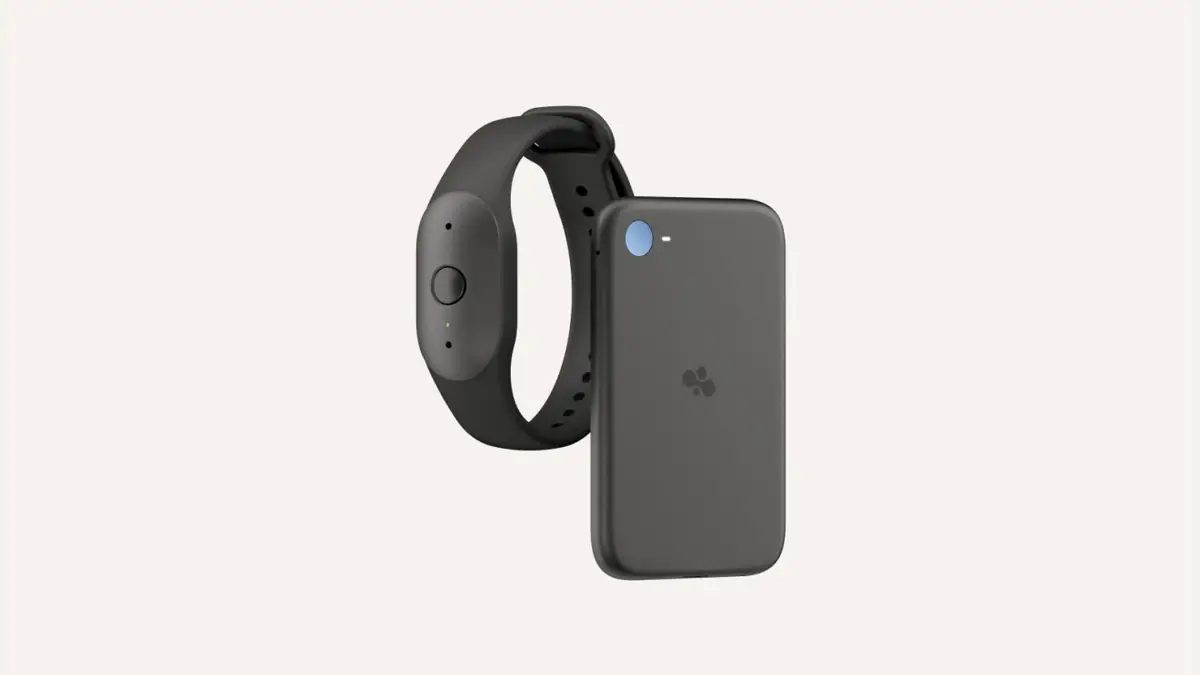
To set up Amazon Bee with Alexa+, you need three things: a Bee device (Bee Frontier is on sale now), the Bee app on an iPhone or Android phone, and a Bee Pro subscription, because the Alexa+ connection is a Pro feature. Once Bee is running in the app, you turn on the optional Alexa+ connection, and your Echo devices can then use voice ID to read your Bee summaries and to-dos back to you.
Amazon has not yet published a full, screen-by-screen walkthrough of the Alexa+ linking flow. This guide sticks to what Amazon and credible launch coverage have confirmed. Where a step has not been documented publicly, we describe it in general terms and say so. For the full launch story, read our main article on Amazon's Bee Frontier and Bee Eclipse AI wearables.
What is Amazon Bee?
Bee is an AI device and app that listens to your conversations during the day and turns them into summaries, to-dos and reminders. Bee was a startup before it joined Amazon. On 15 October 2026, Amazon announced the first two Bee devices made under its ownership:
- Bee Frontier, an AI wearable you can wear on your wrist or clip to your clothes, priced at $74.99 and available now from Amazon.com.
- Bee Eclipse, a credit-card-sized recorder that attaches magnetically to the back of a phone. It starts at $99.99 and Amazon says it is "coming soon".
Both devices send what they hear to the Bee app. Amazon says audio is processed in real time and then deleted, so the app keeps text (transcripts, summaries and insights), not recordings.
What you need before you start
| Requirement | Details | Confirmed by |
|---|---|---|
| A Bee device | Bee Frontier ($74.99) is on sale now. Bee Eclipse (from $99.99) is not yet available. | Amazon |
| A smartphone | Amazon says summaries and memories are available in the Bee app for iPhone and Android. | Amazon, via launch coverage |
| An Amazon account | Bee now supports signing in with an Amazon account. Existing users can keep Apple or Google sign-in. | Amazon |
| Bee Pro | $11.99 a month. New customers get 30 days free. Required for Alexa+ and Amazon.com connections. | Amazon |
| Alexa+ and an Echo device | Needed to ask Alexa for your Bee insights. Echo devices use voice ID to recognise you. | Amazon |
A quick note on regions: Amazon's launch post lists US dollar prices and links to Amazon.com, and it does not say which countries the devices or the Alexa+ connection support. Alexa+ itself is not available everywhere either. If you live outside the US, check that both Bee and Alexa+ are offered in your country before you buy.
Step 1: Get a Bee device and charge it
Bee Frontier is the device you can buy today. Amazon lists these hardware details:
- Up to seven days of battery life
- USB-C charging
- IP67 water resistance
- Dual microphones with noise filtering
- One button and an indicator light that shows when Bee is listening
Charge it fully before you pair it. Bee Eclipse has a single on/off button, an indicator light and, according to Amazon, more than 21 days of battery life per charge. Eclipse has not shipped yet, so we cannot describe its setup.
Step 2: Install the Bee app (iPhone or Android)
Download the Bee app from Apple's App Store or Google Play. Amazon says the app is available on both platforms, which answers a common question: yes, the Bee AI wearable works with Android. The Bee app was redesigned for this launch, and Amazon also released a new desktop app. The desktop app is part of Bee Pro.
What we could not verify: Amazon has not published the minimum iOS or Android versions. Check the store listing before you install.
Step 3: Sign in and pair the device
When you open the app, you'll be asked to sign in. Amazon says you can now use your Amazon account, which is the sensible choice if you plan to use Alexa+, because Alexa+ is tied to your Amazon account. Amazon also says that signing in with Amazon "does not give Amazon access to your private Bee data". Bee's encryption design, covered below, is meant to back that up.
What we could not verify: Amazon has not published how pairing works, whether it uses Bluetooth, or what the app shows during pairing. Like most companion-app wearables, you can expect the app to find the device nearby and walk you through connecting it. Follow the instructions in the app. Bee's earlier marketing described the product as needing "no setup, no training, no manual input", so the process is meant to be short.
Step 4: Learn the button and the light
This step matters more than most, because it controls what Bee hears.
- The button turns capture on and off. Amazon's Bee team has described a single press to start and stop.
- The indicator light shows when Bee is listening. Earlier Bee hardware used a green LED, and Amazon's product images for Frontier show a small green light under the button.
- Auto-off: Amazon says Bee Frontier can switch itself off after a set time with no sound, such as 5 or 15 minutes.
If you're in a meeting, a doctor's appointment or a private conversation, check the light and tell the people around you that Bee is on. Recording rules vary by country and by US state.
Step 5: Start Bee Pro (if you want Alexa+)
Without a subscription, Bee gives you conversation summaries and recaps, plus 14 days of memory. Amazon puts these features behind Bee Pro:
| Feature | Free | Bee Pro ($11.99/month) |
|---|---|---|
| Conversation summaries and recaps | Yes | Yes, unlimited recent summaries |
| Memory | 14 days | Expanded (Amazon does not give a limit) |
| Alexa+ connection | No | Yes |
| Amazon.com connection | No | Yes |
| Gmail, Google Calendar, Outlook | No | Yes |
| Suggested to-dos, daily memories, chat assistant, templates | No | Yes |
| Bee desktop app | No | Yes |
Amazon says new Bee customers get 30 days of Bee Pro free. Amazon has not said whether you subscribe inside the app or through your Amazon account, or what happens to your data after a trial ends without a paid subscription.
Step 6: Connect Bee to Alexa+
Amazon calls the Alexa+ connection optional. Once it's on:
- You can ask Alexa for meeting summaries, to-dos and details from earlier conversations, without picking up your phone.
- Echo devices use voice ID to recognise your voice before they give you your Bee insights, so someone else in the house shouldn't hear your summaries by asking.
- Amazon says that, with Alexa connected, Echo devices can also recognise you and capture conversations for Bee insights.
What we could not verify: Amazon has not published the exact menu path. Based on how Amazon describes the feature, expect to find the Alexa+ option in the Bee app's connections or integrations area, where you approve the link with the same Amazon account Alexa+ uses. If your Echo devices don't have voice ID set up, set it up in the Alexa app before you rely on this feature.
Step 7: Ask Alexa about your day
Amazon hasn't published a list of supported phrases, so treat these as plain-language examples rather than official commands:
- "Alexa, what did we decide in my meeting this morning?"
- "Alexa, what's on my to-do list from Bee?"
- "Alexa, remind me what the doctor said about my care plan."
Alexa+ is built to handle natural requests, so ordinary phrasing should work. If Alexa can't find your Bee data, check that Bee Pro is active, that the connection is on in the Bee app, and that voice ID recognises you.
Optional: Connect Amazon.com and other apps
Bee Pro also lets you connect:
- Amazon.com, so Bee can suggest products based on things you mention, shown on the Amazon homepage and in the Bee apps. It can also support hands-free purchases through Alexa+.
- Gmail, Google Calendar and Microsoft Outlook, for drafting emails, scheduling meetings and pulling out action items.
- Apple HealthKit and photos, to add wellness and visual context to your insights.
Every connection is optional. Amazon says you choose what to share and can stop sharing at any time. Keep in mind that once data goes to another service, that service's privacy rules apply. Our privacy explainer covers this in more detail.
Common setup problems
| Problem | What to check |
|---|---|
| Alexa doesn't know about Bee | Confirm Bee Pro is active and the Alexa+ connection is on in the Bee app |
| Alexa gives the wrong person's insights, or none | Set up or retrain voice ID in the Alexa app |
| No Alexa+ option in the Bee app | Alexa+ or Bee Pro may not be available in your region or on your account |
| Bee stops capturing during quiet periods | That's probably auto-off. Adjust the timeout if the app offers that setting |
| Eclipse won't pair | Eclipse isn't on sale yet. Make sure you're using a Frontier or an earlier Bee device |
These are general troubleshooting points based on how Amazon describes the features, not instructions from an official Bee support page.
Frequently asked questions
Do I need Alexa+ to use Amazon Bee?
No. Bee works on its own with the Bee app. Alexa+ is an optional connection that lets you ask an Echo device about your Bee summaries and to-dos.
Does the Bee AI wearable work with Android?
Yes. Amazon says summaries and memories are available in the Bee app for iPhone and Android.
Is the Alexa+ connection free?
No. Amazon lists the Alexa+ and Amazon.com connections as Bee Pro features. Bee Pro costs $11.99 a month, and new customers get 30 days free.
How does Alexa know it's me asking?
Amazon says Echo devices use voice ID to recognise your voice before sharing your Bee insights.
Can I set up Bee Eclipse yet?
Not yet. Amazon says Bee Eclipse is coming soon, from $99.99, and hasn't given a release date.
Does Bee store recordings of my conversations?
Amazon says no. Audio is processed into insights in real time and then deleted. Transcripts are encrypted with keys that your device controls.
Can I disconnect Alexa+ later?
Amazon says you can stop sharing with connected services at any time and delete transcripts and summaries whenever you want. It hasn't published the exact steps.
Sources
- Amazon: Bee Frontier and Bee Eclipse announcement
- Amazon: Bee Private Compute: How Bee keeps your conversations private
- Amazon: Building Bee at Amazon
- TechCrunch: Amazon's Bee launches two new personal AI devices starting at $75
- iClarified: Amazon unveils Bee Frontier and Bee Eclipse AI devices
Featured image: Amazon. Source